gjPDFs Is on the App Store
March 16, 2026
Tagged with: gjpdfs, macos, app, app store, claude
866 words; 4 minutes to read.
gjPDFs is my second macOS app released on the App Store.
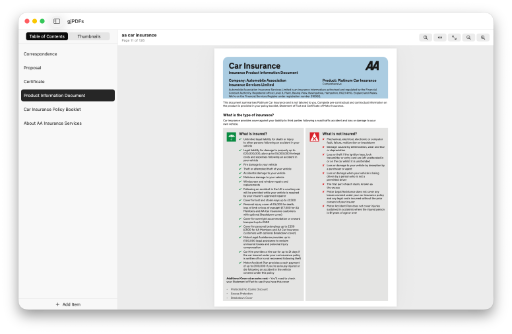
Like most of my apps, gjPDFs, was written to solve a problem I had. I’m pretty much paperless now, storing as much as I can in PDFs. This means I need a PDF editor. My editing needs are pretty simple. I re-order and delete pages, insert pages from other PDF documents, insert whole PDF documents, and create and update the document’s table of contents to simplify navigation. All of these needs, except the last one, can be achieved, for free, using the Preview app that comes with macOS. However, if you want to edit a PDF’s table of contents you need to pay and it’s either more than I want to pay e.g. PDF Expert, or the app doesn’t work how I want it to.
The solution? I’m a SwiftUI developer, so I wrote my own app to do what I want, how I want.
I say I wrote my own app. I didn’t. I didn’t write a single line of code 😱. We currently live in a world of emerging AI impacting everyone’s lives. As a software developer I wanted to see just what AI could do. Several months ago I tried using ChatGPT and Claude to write an app to view PDFs files. The experience was very frustrating. It would frequently get stuck in a loop with me telling it the code didn’t work, “you’re absolutely right” it would say. It would then generate different code that didn’t work. I would tell it this, it would agree and proceed to generate the original code that didn’t work. Rinse and repeat until my free tokens had expired, I was too tight to pay to upgrade my account, so I had to wait until my tokens refreshed to continue the battle. Very frustrating.
The recent release of Xcode 26.3 included support for agentic coding, allowing:
“Agents like Claude Agent and Codex can now collaborate throughout the entire development life cycle, giving developers the power to streamline workflows, iterate faster, and bring ideas to life like never before. Agents can search documentation, explore file structures, update project settings, and verify their work visually by capturing Xcode Previews and iterating through builds and fixes.”
The media were also reporting that the AI agents’ coding skills were much improved, and Anthropic’s Claude Agent was probably the best for generating SwiftUI code.
I decided to try an experiment to see if Claude could generate a macOS PDF editing app from start to finish without me writing any code. Initial impressions were very good, but I soon ran into free token limitations. Having to wait 5 hours for my tokens to refresh was very frustrating, especially given that it was doing such a good job. I caved in and upgraded my free account to the £18 per month (with VAT) account with increased tokens. After this I don’t remember running out of tokens.
Then end result is the app you see in the Mac App Store. I honestly didn’t write a single line of code. I’ve examined and tested all of the code Claude has written, but I didn’t write any of it. On a couple of occasions, it would have been quicker for me to fix the code that wasn’t working, but I persevered and with the right instructions got Claude to fix the problem. I did have to make some changes to the project settings in Xcode that Claude was unable to make itself but able to tell me exactly what to change. I also created the app icon myself. I’m no designer but the icons it came up with were awful. Claude event wrote the description text and keywords needed for the Mac App Store.
I’m blown away by what Claude generated. But, and this is a big but, it needed an awful lot of hand-holding and careful prompting to produce code that worked in the way needed. It wasn’t just a case of saying “generate a macOS app the edits PDF documents”. It took many hours of prompting and testing to get the final app, although that was much less time than it would have taken me to write it from scratch. Amazing!
If you use PDFs, especially if you edit their table of contents or reorganise their pages, download gjPDFs using the link below and give it a try. Hopefully you’ll find it worth the small fee. And if you enjoy it, please consider leaving a review—thanks!